
Every good glow up story starts with a “before” photo you’re slightly embarrassed by.
Hi, I’m Mariana! I’m an engineer on Rover’s SRE team, the team responsible for the infrastructure behind Rover, from the production services that connect pet parents with pet care providers to the internal tools our engineering teams rely on every day. We manage everything across multiple AWS accounts: networking, security, CI/CD, and the platforms that keep things running smoothly. It’s a lot of moving pieces, and a big part of our job is finding ways to make all of it more reliable, more secure, and a little less chaotic over time.
And our “before” photo…? 9 AWS accounts, engineers running terraform apply from their laptops, and a master branch that wasn’t always telling the truth about the state of our infrastructure.
This is the story of how Rover adopted Atlantis, hit some rough patches, restructured an entire repo to make it work, and then gave the whole thing a security glow up.
If you’re managing Terraform across multiple AWS accounts, or thinking about automating your infrastructure workflow, there’s something in here for you.
Already running Atlantis and just want the security patterns? Skip straight to Season 3: The Security Glow Up.
Season 1: The Origin Story
Episode 1: Where It All Started
Rover’s infrastructure lives in AWS, and we manage it using Terraform as our Infrastructure as Code (IaC) tool. Almost everything lives in a single repository, which acts as a mono repo for our infrastructure. Networking, IAM, application resources, some CI/CD pipelines, security configuration, it’s all there, organized across 9+ AWS accounts.
To run Terraform, we use a standardized containerized wrapper with Rover-specific conventions to enforce consistent execution across environments. IaC is fantastic in principle. The infrastructure is version-controlled, reviewable, and reproducible. But at scale, it also introduces its own set of challenges. When dozens of engineers are making changes across hundreds of Terraform roots and multiple accounts, the question stops being “how do we write the code” and becomes “how do we safely and consistently apply it.”
That’s where we were. Engineers ran terraform plan and apply from their laptops for some use cases. There were also workflows with partial automation through CI pipelines. But there was no single, consistent way to go from “code in a PR” to “infrastructure deployed.”
Over time, a few familiar patterns started to show up:
Environment drift. The same Terraform code was supposed to be applied in both staging and production. Sometimes only one got updated. We called these “unclean roots”, directories where the code in the repo didn’t quite match what was deployed.
The merge-apply gap. Code would sometimes get merged without the corresponding Terraform changes being applied.
Rollbacks took effort. Since we applied changes after merging, a failed apply in production meant creating a fix PR, getting it reviewed, approved, merged, and trying again.
These aren’t unique to Rover. They’re the natural growing pains of any team managing infrastructure as code across multiple accounts. We wanted automation that lived where our code reviews already happened: GitHub.
Episode 2: Discovery
Someone on our team had seen Atlantis at a previous company, and the idea clicked: what if PRs were the only way infrastructure changes got applied?
For the unacquainted: Atlantis is an open-source, self-hosted tool that turns your GitHub pull requests into the single source of truth for infrastructure changes. It watches your repos, and when you open a PR with Terraform changes, it automatically runs terraform plan and posts the output as a PR comment. Want to apply? Comment atlantis apply. No new UI, no context-switching, everything stays in GitHub.
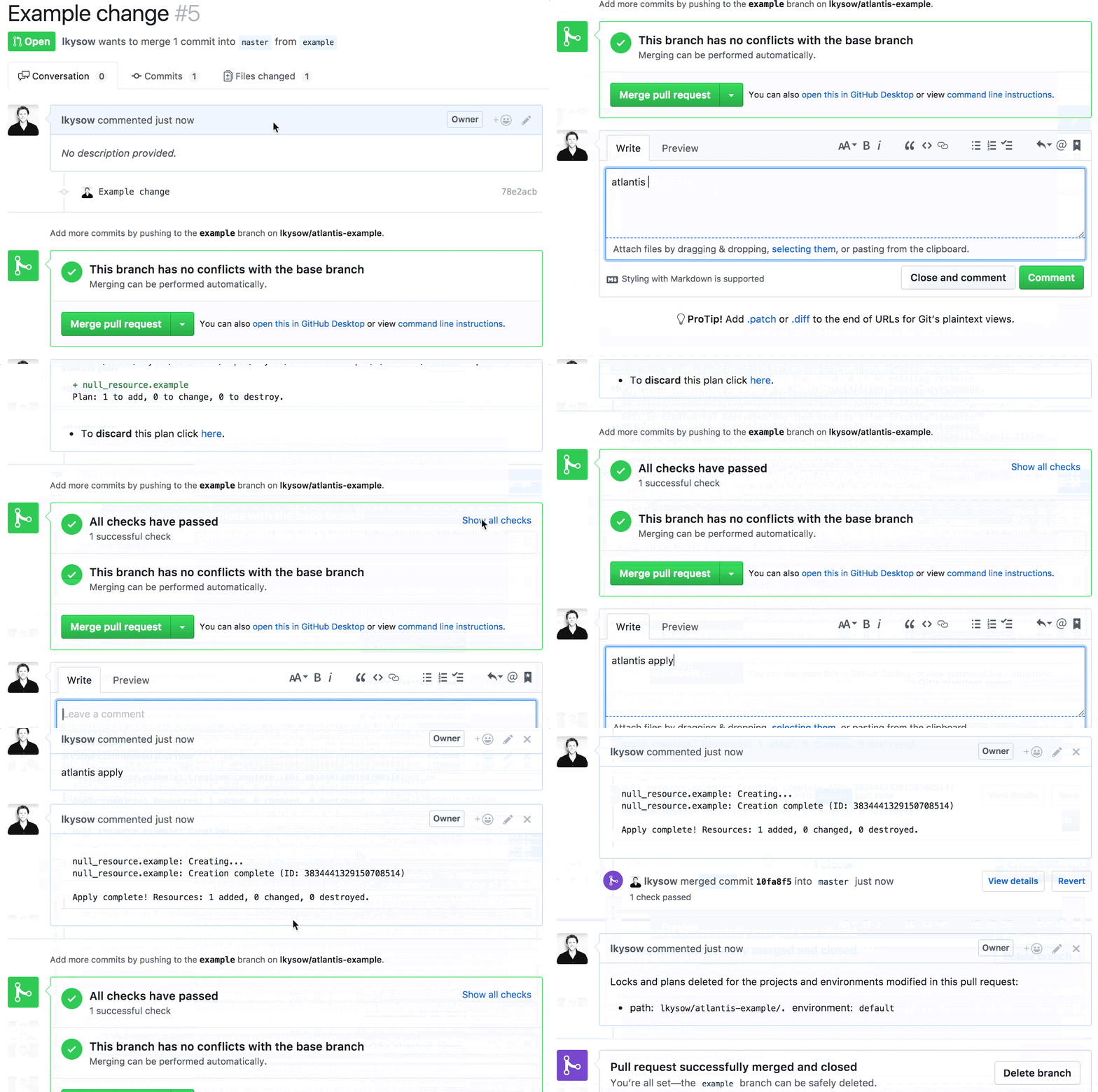
What we wanted: the code in the repo is the infrastructure, and PRs are the only way changes get applied. No more wondering if someone applied something locally without a PR. No more drift between what’s merged and what’s deployed. Your plan output lives right next to the code review, reviewers can see exactly what will change without needing AWS access, and since apply happens before merge, you catch failures before they hit your main branch, not after.
We did consider doing the automation with GitHub Actions, but Atlantis felt like the better fit… It’s open source, self-hosted, and purpose-built for Terraform workflows. That gave us full control over the server, the security model, and the configuration, with no vendor lock-in. It also offers deep server-side workflow customization, which we knew we’d need for our multi-account setup. And since it lives entirely inside GitHub, the tool our engineers already use every day, the adoption barrier was essentially zero. No new dashboards, no separate CI pipeline to maintain for infrastructure, just PR comments.
We did some prep work first (restructuring our Terraform repo, cleaning up tech debt), then started building.
Season 2: The Awkward Phase
Episode 1: Nine Puppies, Zero Coordination
We shipped Atlantis. It worked. We were thrilled. For about a week.
Because of how our repo was structured, with a single Terraform directory potentially applying to multiple AWS accounts, we needed nine separate Atlantis instances, one per account. Every time you pushed a commit, up to nine new PR comments appeared. It was like adopting nine puppies at once: adorable in theory, absolute pandemonium in practice.
The instances didn’t know about each other, so coordinating merges was tricky. Restart an instance? The PR locks and plan files, stored on disk, vanished.
Despite all this, we still believed Atlantis was the right tool. The problems we were hitting were about our repo, not the tool itself. Here’s the lesson that applies to anyone adopting Terraform automation: your repo structure determines your automation experience. If your Terraform layout doesn’t match the assumptions of your tooling, no amount of configuration will fix it. We learned this the hard way.
Episode 2: From Nine to One
We restructured our entire Terraform repo so that one root = one AWS account, collapsed nine Atlantis instances into one, and finally got clean, readable PRs.
We didn’t give up on Atlantis. We gave up on the repo structure. The new layout let us run a single Atlantis binary on an EC2 instance, managed with systemctl, handling all accounts with one consolidated comment per PR.
A single instance handling 9+ accounts needed custom tooling. We wrote a Python script that ties it all together: dynamically generates Atlantis configuration by scanning the repo, groups projects by account, enforces approval requirements for protected environments, and orchestrates the Terraform wrapper containers for each run. We also added a Redis cluster for distributed locking, so PR locks would survive server restarts.
The result? Apply-before-merge enforced through GitHub status checks. The nine noisy puppies became one well-trained dog.
Season 3: The Security Glow Up
This is the part that might be most useful if you’re running Atlantis (or any Terraform automation) in production. Our Cybersecurity team ran a threat model and found our initial model allowed infrastructure operations to run with broader permissions than necessary, prompting a redesign to enforce strict least-privilege boundaries.
Here’s why this happens. Some Terraform roots legitimately need to provision resources across multiple AWS accounts in a single run. To support this, Atlantis was running with a powerful set of credentials. But those same credentials were available to any code that ran during a plan, including code in unreviewed PRs. If you’re running Atlantis with a single IAM role that has broad access, you likely have this same exposure.
At a company built on trust between pet parents and pet sitters, we take access control personally. The SRE and Cybersecurity teams teamed up with one goal: keep Atlantis powerful, but make it safe.
Here’s the playbook we followed. The specifics are about our setup (Atlantis + Docker on EC2), but the principles apply regardless of how you run Terraform: GitHub Actions, Terraform Cloud, or even local runs with a CI wrapper.
Episode 1: Use It and Lose It (ephemeral credentials)
The principle: generate short-lived credentials per Terraform run, not long-lived shared ones.
Every Terraform run should get credentials scoped to that specific operation, and those credentials should disappear when the run is done. Like a dog walker who gets the house key for the walk and returns it after, not a spare that works forever.
How we did it: Each run receives only the credentials required for its scope, with access dynamically generated and tightly constrained.
How you might do it: if you’re on GitHub Actions, OIDC federation lets each workflow assume a role without any stored secrets. Terraform Cloud and HCP offer dynamic provider credentials that work similarly. The mechanism differs, but the goal is the same: no run should have access to credentials that outlive it.
We restricted access to instance metadata and other sensitive endpoints from execution environments. More broadly, the idea is: block access to anything the run shouldn’t need.
Episode 2: Not Everyone Gets the Keys (graduated IAM)
The principle: a plan and an apply are fundamentally different operations and should have fundamentally different permissions.
terraform plan only needs to read your infrastructure state. terraform apply needs to change it. Giving both the same IAM role means every plan runs with the power to modify your entire environment.
How we did it: We implemented tiered access controls separating read-only planning from privileged apply operations, with additional safeguards for higher-impact changes.
How you might do it: Most Terraform automation tools let you configure different credentials for plan vs. apply. Even if you only split into two roles (read-only for plan, scoped admin for apply), you’ve dramatically reduced the blast radius of an unreviewed PR. The key insight is that terraform plan, which often runs automatically and without review, should never have write access.
Episode 3: Need to Know Basis (context-aware injection)
The principle: only give a Terraform run the credentials and tokens it actually needs. Nothing extra.
If a run only touches Cloudflare resources, it shouldn’t have your Splunk token. If it only provisions in staging, it shouldn’t have production credentials. The less a run has access to, the less damage it can do if something goes wrong.
How we did it: Our Python script reads each root’s configuration and injects only the tokens that root requires. For roots that span multiple AWS accounts, it assumes a role in each specific account and generates a credentials file with a profile per account. Instead of one broad role that can reach everything, each run gets precisely scoped access.
How you might do it: in GitHub Actions, this means separate secrets per workflow or environment rather than org-wide secrets. In Terraform Cloud, it means workspace-specific variable sets. The tooling varies, but the question is always the same: does this run have access to things it doesn’t need?
The Post-Credits Scene: Open Source Contribution
While closing credential gaps, we found that Terraform didn’t support ephemeral ECR authentication tokens yet, so we built it and contributed it upstream.
We’d switched to Terraform’s ephemeral resources for aws_eks_cluster_auth to prevent sensitive credentials from being stored in plan files. When we tried to do the same for ECR, the resource didn’t exist yet. So we contributed PR #44949 to the official Terraform AWS provider, adding ephemeral aws_ecr_authorization_token support. If you’re using Terraform with ECR, this one’s for you too.
What We’d Tell You Over Coffee
Match your repo to your tools. Our first Atlantis attempt failed because of repo structure, not the tool. If you’re adopting any Terraform automation, audit your repo layout first. One root per account (or per deployment unit) will save you pain.
Treat security findings as feature requests. Our CyberSec threat model could have been demoralizing. Instead, it became the catalyst for the best version of our system. Ephemeral credentials, graduated IAM, context-aware injection: none of this would exist without that exercise.
Every version was better than the last. Nine noisy instances, a security gap, two major restructurings. We’d still be planning if we’d waited for perfect. The best companions aren’t always well-behaved on day one. Some need training, some need boundaries, and some need you to reorganize your entire home before they stop knocking things over. Atlantis was all three, and now it’s the most reliable member of the team.
Thanks for reading! If you’re going through your own Terraform glow up, we hope this helps.