
Hey, I’m Kostas and I work as a Cyber Security analyst here at Rover! Our team is responsible for keeping Rover, its employees, and its customers safe from the constantly evolving threats out there. Day to day, this means we monitor our systems around the clock, investigate suspicious activity, respond to incidents, and work to close security gaps before attackers can take advantage of them. We are the ones who get the first call when something looks wrong, and it’s our job to figure out fast whether it’s a real threat or just noise.
AI is the big thing in tech right now, and Rover is no exception. Attackers are using AI more and more to make their attacks more efficient, stealthier, and larger in scale. That means we’re getting attacked more often, which means more and more alerts landing on our analysts’ desks. So, to keep up with this growing volume, we needed to put AI to work for us too — and that’s exactly what we did.
Our main goal is to automate as much of the initial triage process as possible, and give analysts as much context as we can so they can move straight to the next steps. Let’s walk through how we’ve done that so far.
How we used to do things
We use various tools to monitor our systems, like EDR, SIEM, Observability tools, and many others. We’ve configured and tuned these tools to alert us whenever they detect something abnormal. When one of them creates an alert, a Jira ticket is automatically created on our Security Operations board with some relevant information.
From there, an analyst would go through the alert details and manually gather more logs and clues from other tools — checking things like whether an IP was known to be malicious, pulling process trees, or correlating login history across systems — in order to investigate and triage it. This typically took the analyst 20-30 minutes per alert, just to gather enough context to make a decision. As you can imagine, with alert volumes growing, that time added up fast and made it harder to keep up.
What we did
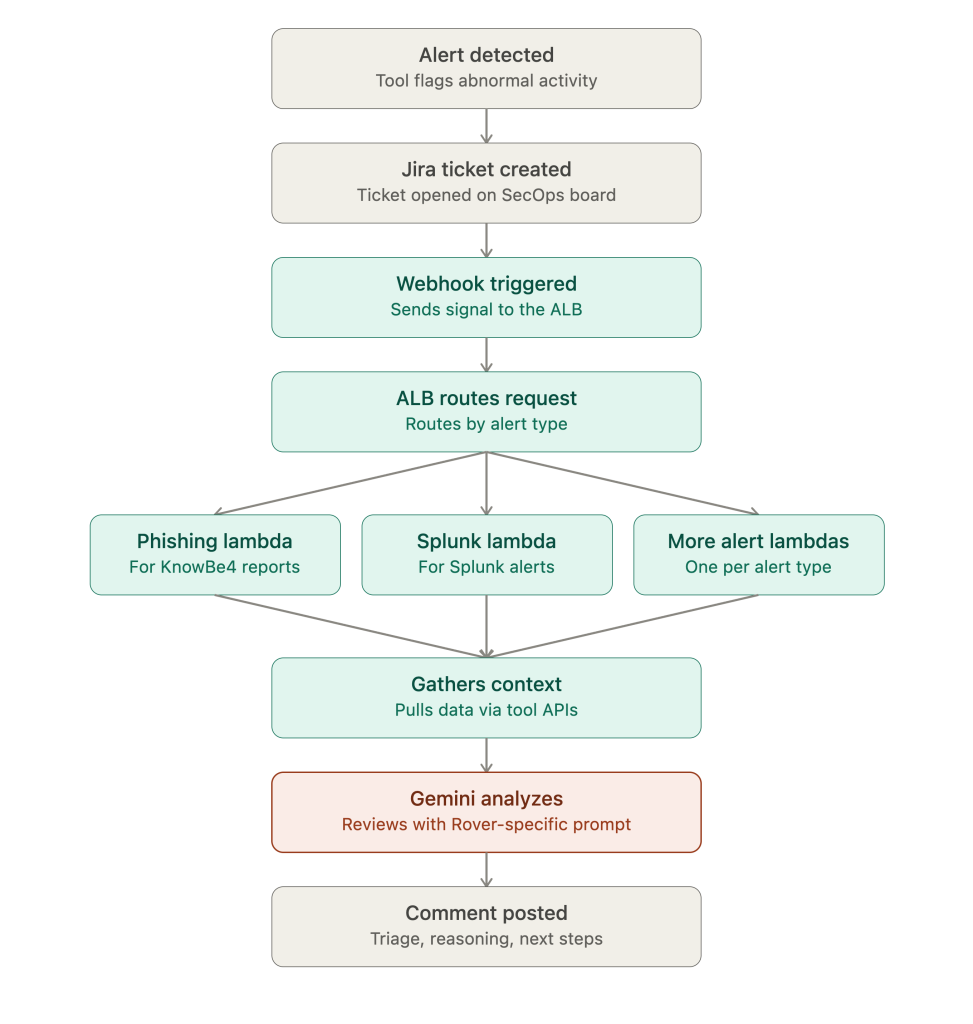
To manage the rising volume of alerts, we automated the initial triage process by connecting our systems and using AI to gather and analyze all the relevant details. Here’s what the process looks like now.
A tool detects an abnormality and creates an alert, which in turn creates a ticket in Jira. Once the ticket is created, a webhook sends a signal to an ALB, which routes it to the relevant Lambda. We’ve built a separate Lambda for each alert type, since every type of alert needs a different set of data sources and context to be triaged properly — a phishing alert and a suspicious login alert don’t need the same information. The Lambda then gathers the relevant data from our tools via their APIs and passes it to Gemini for analysis.
A key part of this step is the prompt we give the model. It needs to clearly explain what we want it to do, and include extra context about the Rover environment — things like our asset inventory, known false-positive patterns, and internal naming conventions — so the analysis is accurate and relevant instead of generic. Once the analysis is complete, a comment is posted on the Jira ticket with the triage information, the reasoning behind the conclusion, a final verdict, and a recommendation for next steps.
One of the advantages of this design is how easy it is to extend. Since each alert type has its own dedicated Lambda, adding automated triage for a new alert type doesn’t mean redesigning the pipeline — it just means writing a new Lambda that knows how to gather the right context for that alert type and pass it to Gemini with the right prompt. The webhook, ALB, and Jira integration stay exactly the same. This means we can keep growing the number of alert types we automate without the system becoming harder to maintain.
Example: Phishing email triage
Let’s walk through a real case to see the full pipeline in action.
An employee received a suspicious email and reported it. Since we use KnowBe4 as our phishing reporting provider, the report goes to them first for initial triage, and KnowBe4 creates a Jira ticket with the original email attached as a raw .eml file, headers and all.
From there, our webhook and Lambda take over. The Lambda downloads the .eml attachment from the ticket, parses out the headers and body, and pulls out any links found in the email. It also does a bit of its own forensic work in Python before even calling the AI — for example, checking the age of the sender’s domain, since a domain registered a few months ago is a common sign of a scam campaign. All of this — headers, body, links, domain age — gets packaged together and sent to Gemini.
The prompt we give Gemini is detailed on purpose. It tells the model exactly how to weigh different signals — for example, distinguishing a mismatched “reply-to” address (a red flag) from normal marketing tracking links (usually harmless), and it explicitly tells the model to treat anything inside the email as untrusted content, not as instructions to follow. This matters because a malicious email could otherwise try to manipulate the AI itself.
In this case, here’s what came back:
Verdict: Threat — Risk score 95, High confidence
The email impersonated an internal Rover employee forwarding an urgent, overdue invoice for $48,856, targeting a specific employee in a classic business email compromise (BEC) attempt. The biggest red flag was a “reply-to” address that didn’t match the sender’s domain — a gmail address that would have quietly redirected any reply straight to the attacker instead of the person being impersonated. On top of that, the email leaned on urgency and a fabricated backstory (“previous emails bounced”) to pressure quick action, and the sender’s domain itself was only 256 days old, typical of short-lived scam infrastructure. Even though the email passed SPF/DKIM/DMARC checks, the AI correctly flagged that authentication only proves who sent the email — not that its intent is legitimate.
Based on this, the AI recommended blocking both the sender address and the reply-to address, notifying the targeted employee, and escalating to Tier 2 to check whether the domain was part of a wider campaign. All of this was posted as a comment on the Jira ticket within seconds of the report reaching us — work that would have taken an analyst many minutes to piece together by hand.
Example: an AWS permission enumeration alert
This one shows the second flow in action — where the Lambda creates the ticket itself instead of reacting to one that already exists.
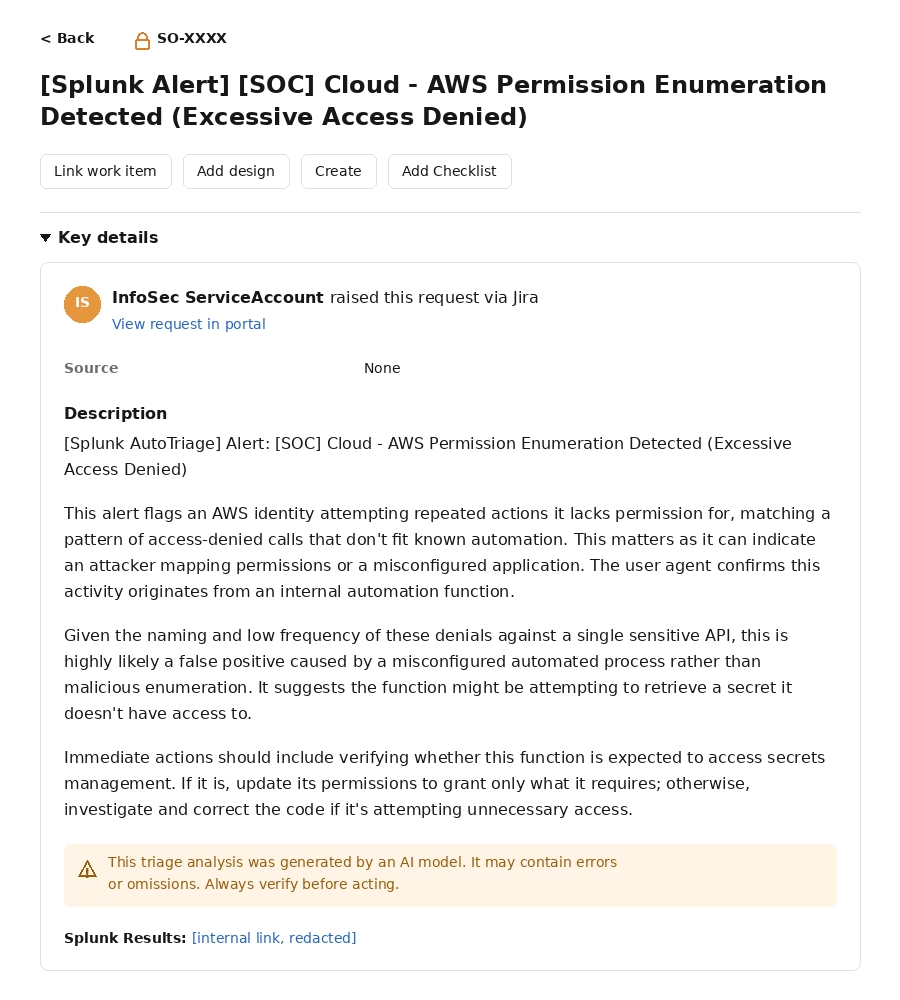
The triggering alert flags AWS accounts making repeated access-denied calls that don’t match known automation. In this case, it caught an assumed role tied to an internal automation function attempting a sensitive API call it didn’t have permission for, several times within a short window, all denied.
The Lambda pulled these results along with the underlying SPL query from the Splunk API and passed them to Gemini for triage. Gemini’s analysis concluded this was very likely a false positive rather than an active attacker — the small number of denials, the fact that they were all for a single API call, and the identity of the role itself (a log-pulling function, not something that looks adversarial) all pointed away from malicious enumeration. Its read was that the Lambda function behind this role was probably misconfigured and trying to reach a secret it doesn’t have permission for.
Rather than flagging this to be blocked or escalated, the recommended action was more mundane but practical: check whether that Lambda function is actually supposed to access Secrets Manager.
This is a good example of the system doing more than just detecting “something bad” — it’s making a reasonable case for why something is probably safe, which saves an analyst from having to manually rule out a false positive by hand.
The impact so far
The numbers back up what we set out to do. Over the past year, our ticket volume grew by 640%, while our MTTR (mean time to resolution) still went down over that same period — at one point dropping by 4 hours within a single month.
That combination is the real win here. Without automated triage, a 640% increase in ticket volume would normally mean a much slower, more overwhelmed response — more alerts sitting in the queue, more time before an analyst even looks at them. Instead, our analysts are handling far more alerts, faster, because most of the initial legwork is already done by the time a ticket lands on their desk.
Conclusion
AI is moving fast, and attackers are already using it to their advantage. If we want to keep up, we have to adapt just as quickly — and that means using AI ourselves, not just defending against it.
What we’ve built so far is a good first step. Alerts that used to take an analyst 20-30 minutes to triage manually are now analyzed automatically within seconds, with a clear verdict, reasoning, and recommended next steps ready before an analyst even opens the ticket. This doesn’t replace the analyst — every AI-generated comment is clearly marked as such and still needs human judgment before any action is taken — but it means our team can spend less time gathering context and more time actually responding to real threats.
This is only the beginning. We’re looking to expand this automation to more alert types, keep refining our prompts as we learn from real cases, and explore new ways AI can support the team beyond initial triage.